There are many great theme option frameworks out there already, like the Options Framework, and the UP Theme Framework. Which is great, alot of this frameworks ideas, and functionality has been built upon the knowledge gained from those frameworks. But neither of them provided me with the extendability i needed/wanted. What i really wanted to do was merge those frameworks and add a little spice. I wanted a few specific things that have been the core reason for this framework.
Section Tabs - I wanted each settings section to have its own "tab" which can be clicked through.
Use the WordPress Core Settings API - I wanted the settings to use the core WordPress functions for creating/editing settings (no point reinventing the wheel).
Custom Error Handling - Inline with the custom tabs i wanted to be able to display error totals, and custom messages for each section/setting.
Easily Extendable - I wanted to be able to extend the framework for custom use applications. For settings fields and custom validation.
Customisable - I wanted to be able to customise the functionality, and style without hacking at the core.
This is why the NHP Theme Options Framework has been created. Every function/action can be customised, with more hook points and configuration options being added with every update.
The NHP Theme Options Framework has an exhaustive list of features, which include...
Simple, Easy to use
Simple Theme Options Framework for WordPress, Leaving you to concentrate on creating beutiful WP Themes.
Built In Field Types
Contains many built in field types for easy use (all basic field types like text, checkbox, select, upload are built in).
Built In Validation Methods
Contains many built in validation methods for clean data saving (email, url, numeric, escape js, no html, html).
Custom Error/Warning Handling
Using the Validation methods you can create custom errorand warning messages for each field type.
Multiple Option Sections
Have as many, or as little sections as you need.
Custom Tab Sections
Want to show additional info in your options panrl? Its there for you to use and abuse.
Extendable Field Classes
Easily create custom field classes for use in your theme options. View WIKI
Extendable Validation Classes
Want custom validation? Just use the extendable Validation Class methods. View WIKI
Fully Customisable
Many Hook points to customise the Framework to your requirements. View WIKI
Framework Screenshots.
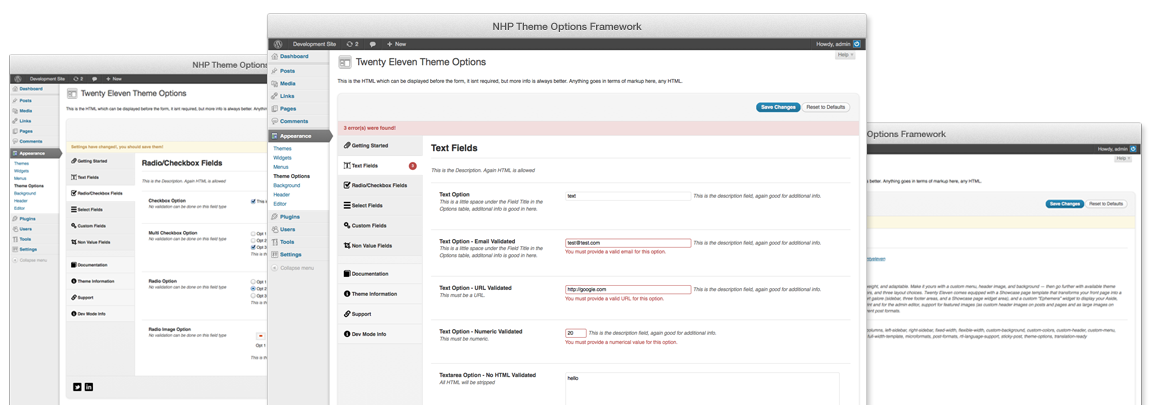
The NHP Theme Options Framework has some slick default styling (all of which is customisable of course). Here is what it looks like in its default state.
Field Types.
The NHP Theme Options Framework has many built in field types, which include...
Text
The most basic of form fields. Basic, but important.
Textarea
Again basic, but essencial.
Checkbox
The humble "Check if you want to.....".
Multi Checkbox
The expanded "Check if you want to.....".
Select
Want to provide a list of possible option values.
Multiple Select
Need the option to have multiple option values at once?
Tiny MCE Editor
Want a full rich editing experience? Use the best editor around.
Radio
Multiple option choices, one outcome?
Radio Images
Great for showing a page layout option.
Button Set
Want to use some jQuery UI goodness? Use a button set.
Date
Privide a calendar widget for users to select a date.
Color
Need some custom colors? Use the Farbtastic color picker.
Upload
Upload images/files, great for logo options.
WP Pages
Display a drop down list of WP pages.
WP Pages Multi
Display a multi select drop down list of WP pages.
WP Posts
Display a drop down list of WP posts.
WP Posts Multi
Display a multi select drop down list of WP posts.
WP Tags
Display a drop down list of WP tags.
WP Tags Multi
Display a multi select drop down list of WP tags.
WP Categories
Display a drop down list of WP cats.
WP Categories Multi
Display a multi select drop down list of WP cats.
WP Menu Select
Display a drop down list of WP menus that you have created.
WP Menu Locations
Display a drop down list of the current themes registered menu locations.
WP Post Type Select
Display a drop down list of WP post types.
Checkbox Hide Below
Checkbox option which hides the next field if not checked.
Select Hide Below
Select menu that will hide the next option based on selected setting.
Field Seperator Divide
Divide the settings section for less intense option fields, divides the settings and adds a border line.
Info Field
Display an info section, great if a setting needs additional info.
Color Gradient
Allow the user to select start and finish colors using the farbtastic color picker.
Multi Text Option
Need dynamic text fields? Its easy with the framework.
Google Fonts Select
want to use a custom font provided by Google Web Fonts? Its easy with the simple dropdown list selction field.
Validation Classes.
The NHP Theme Options Framework has many built in validation classes, which include...
Email
Makes sure the users inputs a valid email address.
URL
Checks the submitted value is a URL.
Numeric
Makes sure the value is numerical.
Comma Seperated Numeric
Only allows numeric values seperated by comma's.
HTML
Filter and clean HTML input just like WordPress does.
HTML Custom
Filter and clean HTML with custom defined rules.
No HTML
Strip HTML content from a string.
No Special Characters
Filter and remove any Special Charaters.
Color
Check for a valid HTML hex value.
Date
Check for a valid date input.
Str Replace
Programatically replace elements of the value.
Preg Replace
Programatically replace elements of the value.
Escape JS
Escape Javascript Code input.
Framework Extended.
The NHP Theme Options Framework has many built in features, buts its best feature is the way it allows you to create / extend the framework. By creating field classes, validation classes, or custom callback functions for both field, and validation.
There are multiple hook and filter references throughout the Framework which are designed so you can spend you time creating great themes. And only worrying about the options if you need very custom functionality (which by the way is a posibility with the Framework).
Check out the WIKI for more details on extending the Core Framework.